
Epson HC720 projector lamp
The Epson HC720 takes lamp ELPLP39, a 170 W lamp rated for 3,000 hours. It is available both as a complete module (bulb fitted in its housing) and as a bare bulb for re-using your existing housing. The same lamp is also sold under 1 other part number, all listed below. It fits 25 Epson models in total.
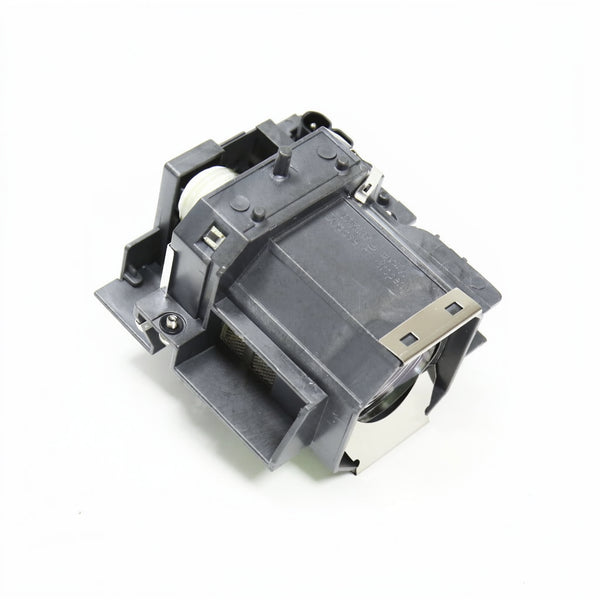
Replacing the Epson HC720 lamp.
The Epson HC720 uses the ELPLP39 lamp, also sold as V13H010L39. The lamp is rated at 170 W, with a rated life of 3,000 hours. We sell it as a complete module (ELPLP39), with the bulb fitted in its housing, or as a bare bulb (ELPLP39) that fits your existing housing.
24 other Epson models use the same lamp, including the ELPHC100, HC1080, EMP-TW720 and EMP-TW980. Owners of any of them can use the same codes.
Both options carry a genuine OEM burner. The module is the quicker swap, because the bulb is already fitted in its housing. The bare bulb costs less, but you move it into your existing housing by hand. Check the code on the old lamp or the model label before ordering. After fitting, reset the lamp-hour counter from the projector's menu, following the user manual. Our 180-day guarantee starts when the lamp arrives and offers a replacement or refund.
Checked against our catalogue and the projector's published specifications, October 2026.Every code this lamp is sold under.
The code moulded into your old lamp or printed on its housing may be any of these. If it appears here, it fits the Epson HC720.
Check the code before you order
The code on your old lamp or its housing should match one of the codes listed. Epson and third-party suppliers sell the same lamp under several numbers.
Not sure it's your model?
The model number is on a label on the base or rear of the projector, and in the on-screen menu under Information. Still unsure? Ask a specialist and we'll confirm.
This lamp also fits 24 other Epson models.
If your projector is one of these rather than the HC720, the same lamp is the correct part.
Common questions.
Which lamp does the Epson HC720 use?
The Epson HC720 uses the ELPLP39 lamp, also sold as part number V13H010L39. It is rated at 170 W, with a rated life of 3,000 hours. You can buy it as a complete module, with the bulb already fitted in its housing, or as a bare bulb that fits your existing housing.
Is V13H010L39 the same as ELPLP39 for the Epson HC720?
Yes, for the Epson HC720, V13H010L39 and ELPLP39 are equivalent codes for the same 170 W lamp, with a rated life of 3,000 hours. The difference is the form: V13H010L39 is the complete module, and ELPLP39 is the bare bulb. Use whichever code is printed on your old lamp or model label.
How long does the Epson HC720 lamp last?
The Epson HC720 lamp has a rated life of 3,000 hours. The same rating applies to the ELPLP39 bare bulb and the V13H010L39 complete module. Rated life is an expected figure, so actual lamp life depends on how the projector is used.
Should I buy the module or the bare bulb for the Epson HC720?
For the Epson HC720, choose the module (V13H010L39) for the quicker swap, or the bare bulb (ELPLP39) for the lower cost. The module has the bulb already fitted in its housing. The bare bulb reuses your existing housing, and you move the bulb across by hand.
Which other Epson projectors use the same lamp as the Epson HC720?
24 other Epson models use the same lamp as the Epson HC720, including the ELPHC100, HC1080, EMP-TW720 and EMP-TW980. Each of them uses the same ELPLP39 bare bulb or V13H010L39 module. If your projector is one of these models, the same lamp codes apply.
The Epson HC720 lamp at a glance.
Replacing the lamp in the Epson HC720.
- Turn the projector off with the Power button, then switch off the power switch on the back.
- Unplug the power cord and disconnect any cables.
- Let the lamp cool for about one hour before handling it.
- Press in the latches on the lamp cover and lift the cover off.
- Loosen the two lamp screws (they stay attached) and pull the lamp straight out; the lamp contains mercury, so recycle it under local rules rather than binning it.
- Gently insert the new lamp and tighten its screws, without touching the glass part of the lamp.
- Refit the lamp cover securely; the projector will not run if the cover is open or loose.
- Reset the lamp usage timer.
Then reset the lamp timer.
Until you reset it, the HC720 keeps counting from the old lamp's hours and will warn that the new lamp is expiring.