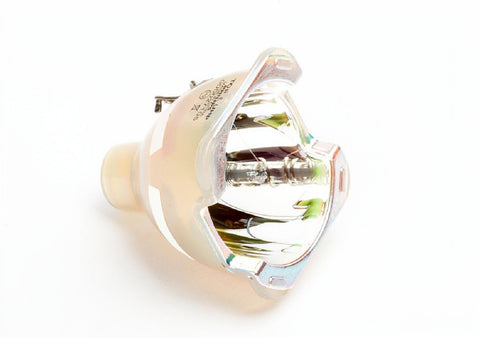
725-BBDM bare projector lamp
We confirm the delivered price for United Arab Emirates on a formal quote, including shipping, duties where we can prepay them, and the correct local warranty terms.
For the Dell 4350, 725-BBDM is supplied as a bare replacement bulb, meant to be fitted into the housing that's already in the projector. No wattage or rated-hours figure is published for this part, so those specifics are left out here rather than guessed at. Compatibility is confirmed for the 4350 only.
We list this bulb by its single part number, 725-BBDM, since no alternative codes are recorded for it. As the bare version, you'll transfer it into your current housing yourself; if that housing is damaged, a module version combining bulb and housing is available separately under the same code.
Identification
Electrical
Supply
Grouped by brand. Every model below takes this same lamp. Tap one for its model page.
Dell (1)
The same physical lamp is sold under these codes. If the code on your old lamp, its housing or the manual matches any of them, this is the correct replacement.
180-day guarantee
If the lamp fails or dims badly within six months of delivery, choose a replacement or a full refund.
Fits, or the return is free
Order against your projector model. If it still doesn't fit, we pay the return label.
30-day returns
Unused lamps in original packaging, no restocking fee. Read the terms
Common questions.
Why is there no wattage listed for this bulb?
That figure isn't published for the 725-BBDM, so rather than print an estimate we've left it out. Everything confirmed about fit and compatibility with the Dell 4350 is included in the listing above.
Is 725-BBDM the only code for this bulb?
Yes, we haven't found any alternative part numbers recorded anywhere for this particular lamp, so it's listed here under this single 725-BBDM code rather than several alternatives.
How do I access the lamp housing on a Dell 4350?
Most Dell 4350 units have a lamp door on the top or side panel, secured with one or two screws. Check your projector's underside for a small padlock or captive-screw icon marking the panel.
What signs suggest the bulb is close to failing?
A dimmer image, a shift in colour balance, or the projector failing to strike on the first attempt are the usual signs. Since no lamp-life figure is published for this part, run-time alone isn't a reliable way to judge when it's due.
Is it safe to handle this bulb with bare hands?
It's better to avoid direct contact with the glass, since oils from skin can shorten a bulb's life once it heats up. Hold it by the base or housing edge instead, and keep it in its packaging until you're ready to fit it.
Lamps often confused with this one.
All 57 Dell lamps →Codes in the same family often differ by a single character, so check the part number against your old lamp before ordering.